
Digital Forklift Pre-Op Checklists: How Telematics Can Support OSHA 1910.178 Inspection Compliance
Picture this: One of your operators completes a required forklift pre-op inspection and finds a problem.
But who finds out about it? And how quickly?
That’s where digitizing the inspection can make this OSHA requirement much easier to manage. Instead of notes ending up on a paper form that could get lost, misplaced, or take a while to end up in the appropriate person’s hands, telematics creates a record of the inspection that makes problems more easily visible to the people who need to respond. It also provides more accountability for what happens next.
This capability addresses an immediate pain point felt by forklift fleets, says Jeff Buyck, CTO of Burwell Material Handling.
Buyck says he recently visited the maintenance and safety leaders of a large fleet that was still completing pre-op inspections on paper. He says when he showed them the digital pre-op inspection capability via telematics, their response was immediate: they wanted it added to their trucks.
“There are so many customers that need that,” Buyck says. “What many forklift fleet teams don’t realize is that telematics is much more than just locating where my machine is at and how many hours are on it.”
What does OSHA expect before a forklift goes into service?
Under OSHA 1910.178(q)(7), powered industrial trucks have to be examined before being placed in service and at least daily.
If trucks are used around the clock, they must be inspected after each shift. A truck should not be placed in service if a condition is identified that adversely affects its safe operation. Additionally, defects that are found must be reported and corrected.
What exactly needs to be checked depends on the truck and application. OSHA’s pre-operation guidance includes common items such as tires, forks, mast components, hydraulic systems and safety devices, followed by operational checks of functions such as brakes, steering, controls and the horn.
What changes when you digitize the pre-op check?
Buyck says one of the simplest benefits to digitizing pre-op inspections is eliminating the gap between completing an inspection and getting the information somewhere useful.
“When you digitize things, you instantly have a traceable record of it,” Buyck says. “You don’t have to worry about what to do with the information or who to hand it off to.”
That alone removes a basic administrative burden. Instead of collecting paper forms, filing them, or entering results later, the inspection information can become part of the fleet record as the operator completes it.
Depending on the telematics platform and how it is configured, you can also connect the inspection to operator access. An operator scans a badge or identifies themselves, completes the pre-op check, and then moves on to operating the truck. Buyck says operator access control and pre-op inspections are two of the most valuable ways material handling fleets can get results from telematics.
Digitization also gives managers visibility into how consistently the process is being followed.
For example, Buyck says fleet managers can review inspection completion time. If hundreds of operators typically take several minutes to complete their checks and one operator consistently finishes in 40 seconds, that doesn’t automatically prove the inspection was not done thoroughly.
However, it gives you a reason to ask a question.
“Are your operators actually taking the time to look for something that isn’t right?” Buyck says.
That’s information you need to know, he says. Telematics can make exceptions visible that otherwise may be difficult to see.
What should happen when an operator finds something wrong?
This is where the digital workflow matters most.
It’s important to keep in mind that the goal of a pre-op inspection isn’t to complete the checklist; it’s to identify conditions that could make the truck unsafe before the equipment goes into service.
For example, let’s say one of your operators notices a hydraulic leak.
Finding it is only the beginning. Someone needs to determine what happens to the truck, get the problem addressed, and make sure the unit doesn’t return to work before it should.
A useful digital workflow should make that path clearer:
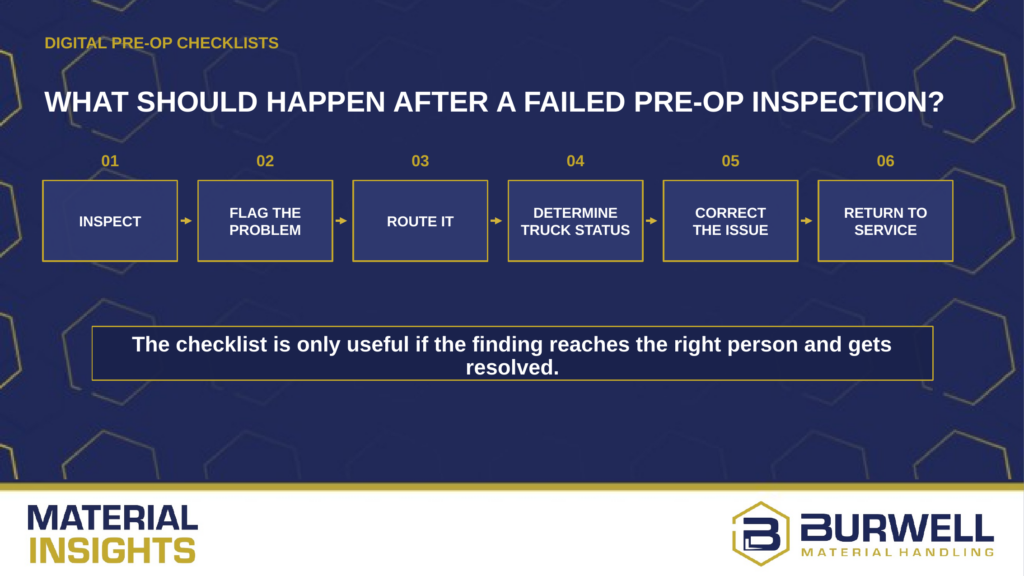
Depending on the telematics platform, it may be able to show which item failed, notify a supervisor or maintenance contact, flag the affected truck, or restrict operation based on established rules.
The digital process helps the right people act on what the operator found.
“Digitizing the checklist is the easy part,” Buyck says. “The real value is making sure the right person sees a failed item, knows what needs to happen next, and follows it through to resolution.”
Who owns the response after a failed inspection?
A telematics system can surface a problem, but it can’t decide how your organization will manage it.
“You need to decide who’s receiving the information, who’s looking at the data, who’s championing specific areas,” Buyck says.
Before rolling out a digital checklist, map the response process just as carefully as the inspection itself.
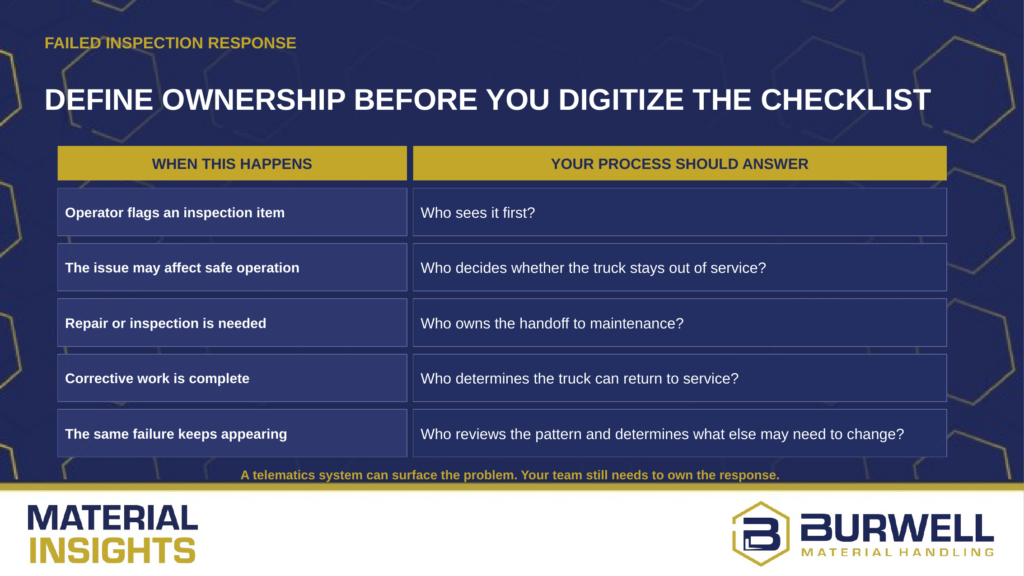
Those responsibilities may sit with different people depending on your operation. The important part is that they’re defined.
“As the dealer and technology solutions partner, we can help train the team,” Buyck says. “But your team then needs to be responsible for making sure that they create new habits to do something with the technology and data.”
A successful rollout includes more than operator training on how to complete the digital checklist. The fleet manager, maintenance team and safety leaders also need to know what information they receive, when they should act, and who owns the follow-through.
What can digital inspection data tell you after 30, 60 or 90 days?
Once the workflow is established, the inspection data can begin showing patterns.
“After you have 30, 60, 90 days worth of data, what are you doing with it?” Buyck says.
Instead of looking only at whether yesterday’s checklist was completed, start asking what the accumulated results are telling you.
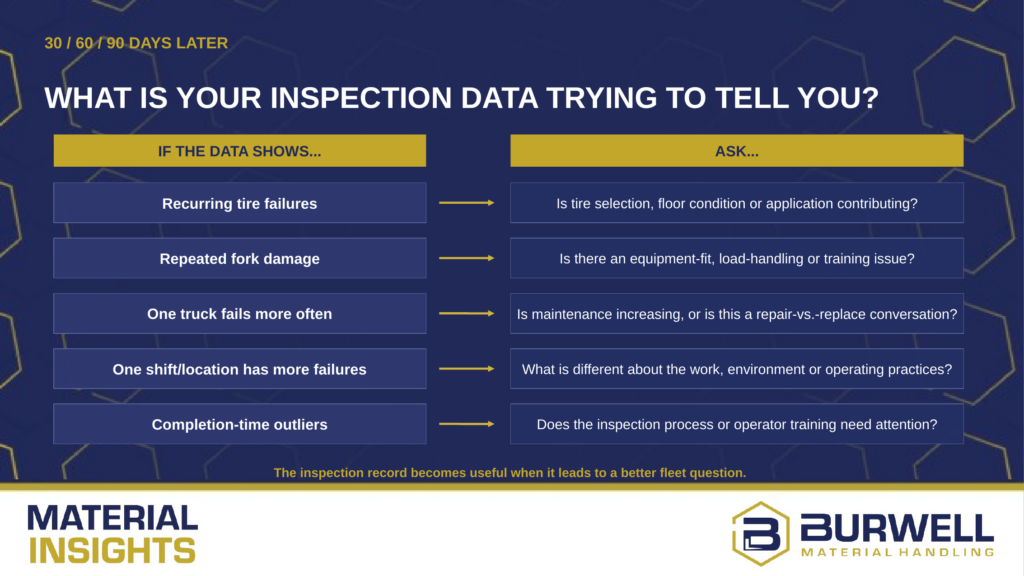
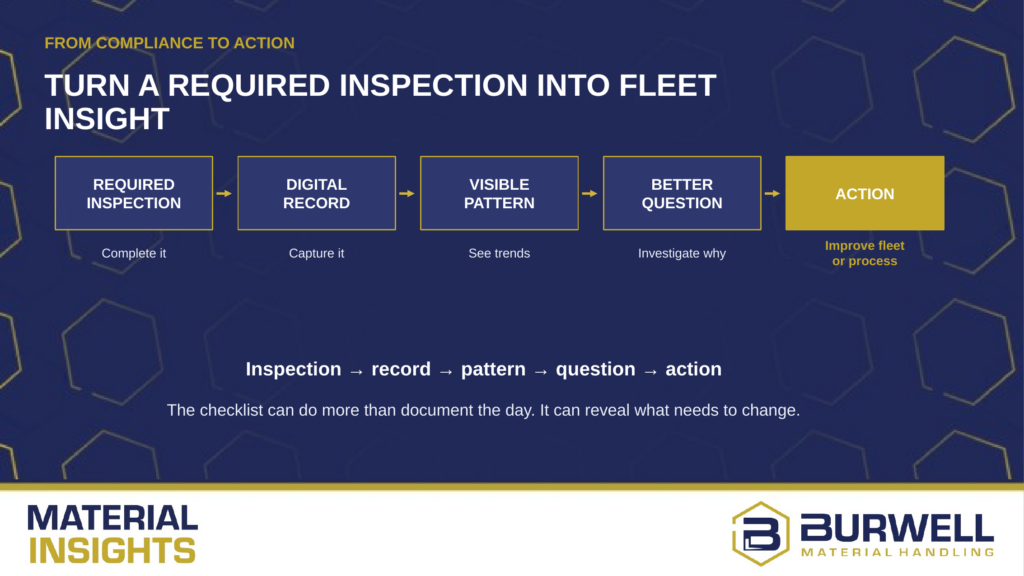
That shifts the role of the checklist to also become another source of information about how the fleet is performing.
Required inspection → digital record → visible pattern → better question → action
Buyck says that’s the difference between simply having the technology and actually using it.
“A digital checklist gives you more visibility,” he says. “The value comes from knowing how to take action and use the information to run your fleet more efficiently and effectively.”
Next step
If you’re considering digital pre-op inspections, talk with the Burwell Connect & Protect team about how telematics can help simplify that workflow and turn daily inspection data into useful fleet insight.